I’ve been an Apple Music user since the day the service launched a decade ago. However, I still like to try Spotify from time to time to see if it’s worth switching. Now that Spotify has lossless audio as well, I gave it another shot and discovered some fun new features that are worth trying out. Note that some of these are Spotify Premium exclusive features, so you won’t be able to use them without a paid subscription. I’m not sure if they’re enough to sway me yet, but you might be different—try these newer Spotify features to make the most of the service.
Hide songs you don’t want to hear
Credit: Pranay Parab
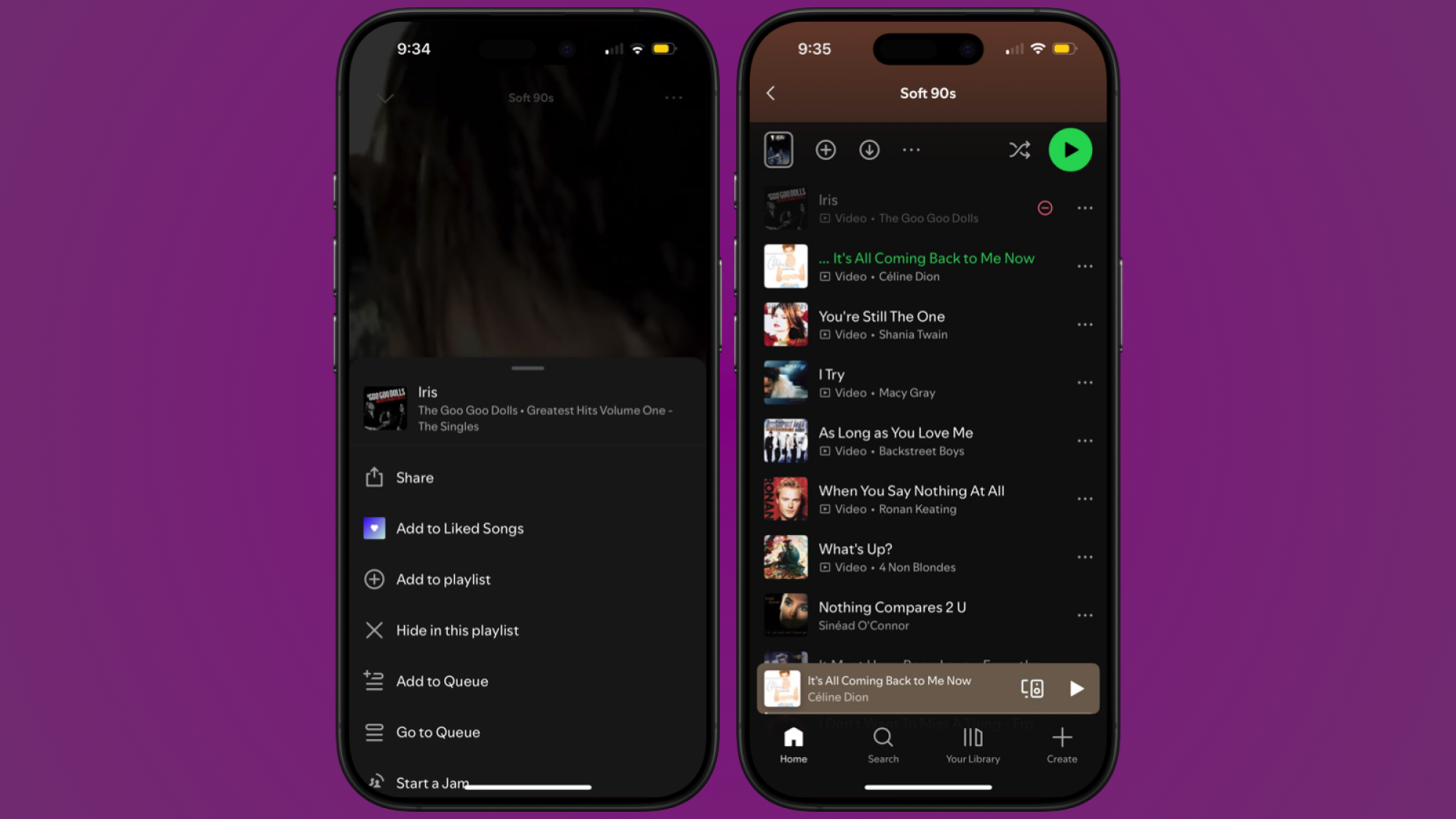
Sometimes, Spotify likes to play songs I’ve heard way too many times already, or a song that I’m just not in the mood for. Luckily, when this happens, I can now quickly hide the song from the playlist. This is easy enough. In the Now Playing view, tap the three-dots button up top, and select the Hide in this playlist button. This will stop the song from playing when you listen to that playlist again, and you’ll see a red minus icon next to its name. You can tap the three-dots button again and hit Show in this playlist to undo this, if you no longer want to hide the song.
Snooze a song for 30 days

Credit: Pranay Parab
While it is a bit of a shame that Spotify doesn’t allow you to block certain songs entirely, you do get the chance to snooze them for a month at a time. I found this feature when Spotify played Iris by The Goo Goo Dolls way too many times over the same weekend for me. I like that song, but not so much that I can listen to it on repeat. Fortunately, I was able to hide it quickly.
When you’re playing a song, expand the mini player and tap the X button next to the song’s name. On the pop-up that shows up, tap Don’t suggest this song anywhere for 30 days. It’ll still take Spotify some time to fully purge it from your algorithmic playlists and feed, but once that’s done, you won’t see the song for the rest of the month.
Premium users get better player controls

Credit: Pranay Parab
If you use Spotify Premium, you have access to better playback controls. The song queue now show buttons to quickly shuffle, repeat, or add a sleep timer to your listening. I love having big buttons for these features, as it makes it easy to access them.
Separately, if you’re on Spotify’s free plan, there’s a good chance that the service automatically enables Smart Shuffle and Autoplay for you. Smart Shuffle looks at the songs in your queue and adds recommended songs to your list, which I’m not a big fan of because it makes the queue twice as long by adding random music. Autoplay is the feature that adds recommended songs to the end of the queue, so that music keeps playing even after the queue ends.
On the free plan, you can’t get rid of Smart Shuffle, but you can disable Autoplay if you dislike it. Premium users can disable Smart Shuffle, too. Tap the profile icon in the top-left in Spotify and go to Settings and privacy > Playback, and scroll to the bottom. You can disable both Autoplay and Smart Shuffle here.
Tweak playlists to your liking

Credit: Pranay Parab
On Apple Music, I have lots of long playlists that I’ve painstakingly curated. Spotify has made managing its playlists a little easier now. You can use the Add, Edit, and Sort buttons to quickly build your own playlists. I enjoy the Add feature because it shows suggested songs, and as you add them, it updates the list to suggest similar music. This has made creating initial drafts of my playlists a lot faster.
What do you think so far?
In some regions, Spotify also now supports creating new playlists from your Liked Songs playlist. It lets you filter these new playlists by genre or mood, so you can match the mood of a specific track in your Liked Songs, and generate a whole new playlist for it. It goes without saying that you can also rename your playlists easily and add custom cover art, too. For cover art, you can try Spotify’s free playlist art maker, but I like using the excellent Denim app to get the job done.
Try smart filters for your song library

Credit: Spotify
Spotify Premium users also get to use smart filters to listen to certain types of music. I haven’t tried this feature yet because it’s still rolling out, but it sounds quite interesting. If you’re using Spotify Premium on mobile or tablet in Australia, Canada, Ireland, New Zealand, South Africa, the UK, or the US, you’ll get this feature soon.
Spotify says you can try it by tapping the filter icon in the top-left corner of the Your Library tab. Here, you’ll see a Smart Filters menu. Select a filter, and the Your Library tab will update to show only those types of music. You can filter music by a specific mood, genre, or activity. The good news is that Smart Filters includes options for music, podcasts, and audiobooks, so you can try it with all types of content.
Talk to your Spotify DJ

Credit: Spotify
Spotify has a built-in “AI DJ” that can find and play songs for you. This year, Spotify has begun rolling out the ability to talk to your DJ to request specific songs. I’m still waiting for this to be rolled to my region, but it’s available in 60 countries at time of writing, so you should try it out. In Spotify’s search tab, look for “DJ,” press play, and the AI DJ will play a mix of music and commentary. You can then press and hold the DJ button on the right, and talk to the DJ to send in your music requests.
Fix your Discover Weekly playlist

Credit: Pranay Parab
If you are unhappy with what Spotify’s been serving up in your Discover Weekly playlist, you can easily refresh it. At the top of Discover Weekly, Premium users will see genre buttons, and tapping any button will create a new 30-song playlist of music from that genre.
‘ The preceding article may include information circulated by third parties ’
‘ Some details of this article were extracted from the following source lifehacker.com ’