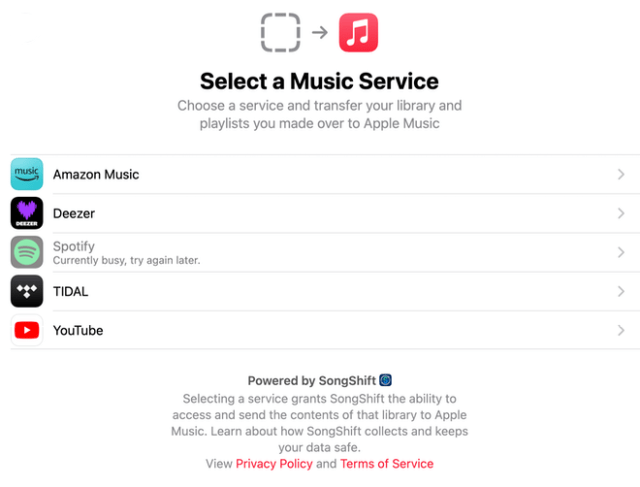
Apple has expanded a new Apple Music feature that allows users to seamlessly transfer music, playlists, and libraries from other streaming services to its platform.
Now available in Australia, New Zealand, the United States, United Kingdom, Brazil, Canada, France, Germany, and Mexico, this tool, powered by a partnership with SongShift, simplifies the process of switching to Apple Music. Below is a step-by-step guide, as outlined by Apple Support, to help users transfer their music collections.
What you need
• A subscription to Apple Music
• An iPhone or iPad updated to the latest version of iOS or iPadOS, Android device with the latest version of the Apple Music app, or a device that can access music.apple.com
• Your username and password to the other music service
• Turn on Sync Library on all of your devices
Transfer music and playlists from other music services to Apple Music
You can start your transfer in the Apple Music app on your iPhone, iPad, Android device, or on the web. You can transfer your songs, albums, and playlists from other music services to Apple Music, but what you can transfer varies and is determined by the service. You can still access all of your saved content in the other service. Transferring music to Apple Music is provided by a third-party.
Transfer to Apple Music on your iPhone, iPad, or Android
- Go to Music Settings:
- On an iPhone or iPad, go to Settings > Apps > Music.
- On an Android device, open the Apple Music app, tap the More buttontap the More button , then tap Settings.
- Tap Transfer Music from Other Music Services.
- Choose from the list of supported music services. Then sign in to the music service.
- Choose what you want to transfer.
- Tap Add to Library.
- Wait for Apple Music to find matches for your music in the Apple Music catalog. Once this process is complete, you’ll see one of the following messages:
- Transfer Complete: Apple Music found matches for the music in the Apple Music catalog and added the music to your library.
- Some Music Needs Review: Apple Music didn’t find an exact match but found similar alternate versions for the music. Tap Review Now, choose an alternate version, then tap Save to add the music to your library.
Transfer to Apple Music on the web
- On your web browser, go to music.apple.com.
- Click Sign In and sign in with the Apple Account you use for Apple Music.
- Click your photo or monogram in the top-right corner, then select Transfer Music.
- Choose what you want to transfer.
- Tap Add to Library.
- Wait for Apple Music to find matches for your music in the Apple Music catalog. Once this process is complete, you’ll see one of the following messages in the bottom of the sidebar:
– Transfer Complete: Apple Music found matches for the music in the Apple Music catalog and added the music to your library.
– Some Music Needs Review: Apple Music didn’t find an exact match but found similar alternate versions for the music. Tap Review Now, choose an alternate version, then tap Save to add the music to your library.
Additional Notes: The time required for the transfer depends on the size of the library or playlists. Users can continue using the Apple Music app while the transfer runs in the background. If you encounter issues, such as missing songs or playlists, ensure both apps are updated and retry the process.
This feature, initially launched in Australia and New Zealand in May 2025, reflects Apple’s ongoing efforts to enhance user experience and attract subscribers from competing platforms. By simplifying the transition process, Apple Music aims to make it easier for music fans to enjoy its extensive catalog and exclusive features in these seven countries. For more details and links, visit Apple’s official support page at support.apple.com/en-us/118249.
MacDailyNews Take: As an added bonus, once Spotify users transfer their playlists to Apple Music they can then hear music that doesn’t sound like a 1970s AM transistor radio.
Please help support MacDailyNews — and enjoy subscriber-only articles, comments, chat, and more — by subscribing to our Substack: macdailynews.substack.com. Thank you!
Support MacDailyNews at no extra cost to you by using this link to shop at Amazon.
‘ The preceding article may include information circulated by third parties ’
‘ Some details of this article were extracted from the following source macdailynews.com ’