We may earn a commission from links on this page.
When digital music first started popping off, the vast majority of us didn’t care all that much about audio quality. Some of the less, erm, legal methods of downloading music offered horrific quality audio, while even the best options at the same (i.e., iTunes) only supported MP3, a relatively low-quality codec. Times have changed: While most of us still aren’t necessarily audiophiles, we do expect high-quality tracks from the streaming services we use—especially if we pay for them. It might not be the “gold standard,” but streaming sounds great, even with wireless headphones.
But there is a clear ceiling in audio quality for those of us that listen this way. Bluetooth can only support 320 kbit/s, which is good enough for many of us, but does mean you lose details originally there in the mastered track. If you have the right setup, including the right streaming plan, you can listen to your home in higher quality, preserving those details. Spotify might’ve been late to the game, but it does now support lossless audio for Premium subscribers, which can playback at up to 24-bit/44.1 kHz. With a good pair of wired headphones, you may hear some finer details than you’re used to.
Now, Spotify is back with another quality booster—at least for a very specific type of subscriber. The feature, called “Exclusive Mode,” is meant for Windows listeners to get even more out of their lossless audio playback. (Spotify says a Mac version is in the works.) But while any increase in audio quality sounds like a good deal, you probably won’t notice too much of a difference here.
How Spotify’s “Exclusive Mode” works
According to Spotify, Exclusive Mode is meant to achieve “Bit Perfect playback” from your PC. It does so by assigning Spotify as your PC’s only source for audio processing. Typically, when listening to Spotify on Windows, you have any number of other apps and services running their audio sources through Windows’s audio mixer. That could include notifications from Slack or Teams, Windows alerts, video playback if you click a YouTube link; anything that makes noise on your PC, routes through the same mixer.
Spotify says that the music you listen to in its app could be altered before it reaches your DAC (Digital Audio Converter), either because Windows resamples it, changes its volume, or mixes these other sounds in. Exclusive Mode, then, disables all of those other audio sources, so that Spotify’s lossless audio is never compromised in that automated mixing. If you’re a purest, that might be a welcome change: You’ll know that the 24-bit/44.1 kHz audio you’re paying for is coming out of your headphones or speakers exactly as it was leaving your Spotify app.
You probably won’t notice a difference with Spotify’s Exclusive Mode
There are some caveats and drawbacks here, however. First, in order to achieve this, Spotify does have to disable all other audio sources on your PC. That means when using Exclusive Mode, you won’t actually be able to hear anything else on your computer. You might miss work messages or important Windows alerts if you’re not paying attentions to your notifications. If that doesn’t matter to you, you can ignore that issue, but it’s important to know before you start using Exclusive Mode, well, exclusively. That includes non-music playback in Spotify itself, including music videos, podcasts, previews, and canvas clips. These might also run through Windows’ default audio source, and, if so, you’ll need to disable Exclusive Mode to use them.
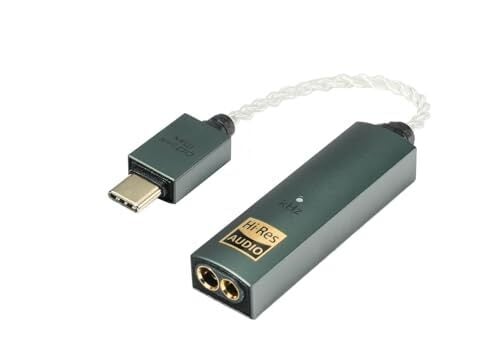
Spotify says you don’t need a DAC or audio interface for this feature to work, but that it works best with one. A DAC converts a digital signal into an analog one, for outputting to wired headphones or speakers. Spotify says if your PC has a headphone or speaker port, it might have a DAC built in, but you may want to confirm this if you want to listen in the highest possible quality. Otherwise, you’ll want to pick up a DAC or audio interface.
What do you think so far?

Of course, the biggest caveat of all is that even with the perfect setup—a DAC, great wired headphones, Exclusive Mode playing back lossless audio—you might not notice the difference. The higher quality the audio files, the better the music will sound, yes, but as with many media formats, there are diminishing returns in what you notice as you improve your setup. Going from MP3 tracks with a cheap pair of earbuds, to AirPods with 320 kbit/s playback on Spotify is going to be night and day; going from the latter to a wired headphone setup with lossless audio running through a DAC, on the other hand, might be day and slightly sunnier day.
If you already have such a setup, and you enjoy listening to your music in the highest possible quality, this is probably a worthwhile setting to try. If nothing else, you can see whether you notice the uptick in quality, and, if you don’t, you can disable it, and get the rest of your Windows sounds back.
How to enable Exclusive Mode in Spotify
Again, this feature is currently exclusive to Spotify Premium members on the Windows desktop app. Then, connect your DAC to your computer. (Ignore this if your computer has a DAC.) Now, open Spotify, then head to Settings > Playback > Output. Select your audio device from “Device,” then click the toggle next to “Enable exclusive mode for this device.”
Spotify recommends you head back to Playback settings and turn off the following features while using Exclusive Mode: “Crossfade,” “Automix,” “Normalize Volume” and “Equalizer.”
‘ The preceding article may include information circulated by third parties ’
‘ Some details of this article were extracted from the following source lifehacker.com ’









![[3rd Place] Royal Family Round 2 Front Row | IDL 2026 New York Series](https://celebrity.land/en/wp-content/uploads/2026/05/1778261593_maxresdefault-120x86.jpg)